
Microsoft Family Safety
About this app
Screenshots
Application Overview
Microsoft Family Safety is a parental control app that focuses on fostering balanced screen time, ensuring online safety, and promoting transparency within families. It provides tools for monitoring and managing device usage across multiple platforms, including Windows, Xbox, and Android devices. The app aims to empower parents to guide their children in navigating the digital world responsibly.
Key Features
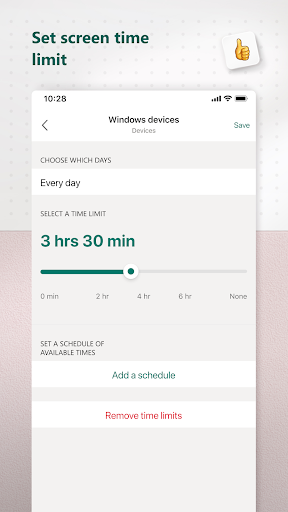
- Screen Time Management: Parents can set daily time limits for apps, games, and devices, helping children balance their online and offline activities.
- Content Filters: The app allows users to block inappropriate websites and restrict browsing to child-friendly content using Microsoft Edge.
- Location Sharing: Family members can share their locations with each other, providing peace of mind when children are traveling or away from home.
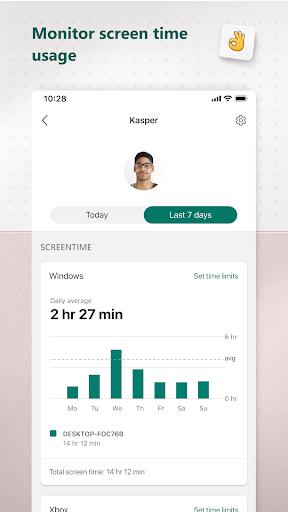
- Activity Reports: Weekly summaries of children’s online activities enable open conversations about digital behavior and responsible internet use.
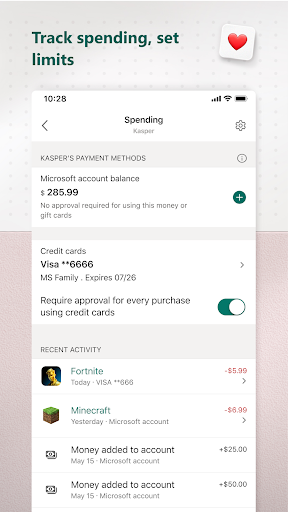
- Spending Controls: Parents can add funds to their child’s Microsoft account and set spending limits for app purchases, games, and subscriptions.
Pros and Cons
Pros:
- User-friendly interface makes it easy for parents to configure settings.
- Cross-platform compatibility ensures comprehensive coverage across devices.
- Encourages healthy digital habits through customizable time limits and activity tracking.
Cons:
- Some advanced features may require a Microsoft 365 subscription.
- Limited functionality on iOS compared to Android and Windows.
Conclusion
Microsoft Family Safety is an excellent tool for modern families seeking to navigate the challenges of digital life. By offering robust features like screen time management, content filtering, and location sharing, the app helps parents protect their children while fostering independence. While there are minor limitations, its benefits far outweigh them, making it a valuable addition to any family’s digital toolkit.


