
Clip Studio Paint
Art & Design
About this app
Name
Clip Studio Paint
Category
Art & Design
Price
Free
Safety
100% Safe
Developer
CELSYS,Inc.
Download
10M+
Screenshots
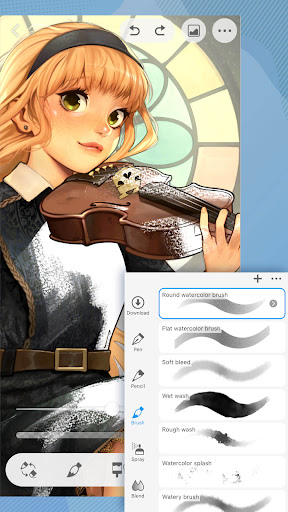


Application Overview
Clip Studio Paint offers an extensive suite of tools tailored for digital painting, comic creation, and animation. Its intuitive interface ensures ease of use while providing access to advanced features. Whether you're sketching, inking, or coloring, the app provides a seamless experience with its customizable brushes and precise pen pressure sensitivity.
Main Features
- Variety of Brushes: With over 50,000 brush materials available, users can choose from pencils, watercolors, oils, and more to suit their artistic style.
- Layer Management: The app supports up to 10,000 layers, allowing for complex compositions without compromising performance.
- 3D Tools: Incorporate 3D models, mannequins, and perspective rulers to assist with anatomy, poses, and backgrounds.
- Animation Support: Create frame-by-frame animations and export them as GIFs or video files.
- Cloud Integration: Sync projects across devices effortlessly, ensuring continuity in your creative process.
Pros and Cons
Advantages
- Highly customizable tools cater to individual preferences.
- Extensive library of free and premium resources.
- Regular updates introduce new features and improvements.
- Supports PSD file imports and exports for compatibility with other software.
Disadvantages
- The abundance of features may overwhelm beginners.
- Subscription-based pricing might not appeal to all users.
- Advanced functions require time to master fully.
Clip Studio Paint stands out as a comprehensive solution for digital artists seeking flexibility and power. Its robust feature set makes it suitable for everything from quick sketches to intricate comic panels and animations. While it has a learning curve, the investment pays off with unparalleled creative freedom.


